How to add or remove columns in your People View
When you’re looking at your People list—your contacts, it displays a set of default columns such as:
-
Name
-
Company Name
-
Prefix
-
Suffix
-
Phone
-
Email
-
Group
-
Contact Date
-
Marked
-
Client ID
You can customize this view to show only the columns you need—and in the order you prefer.
Steps to add or remove columns
-
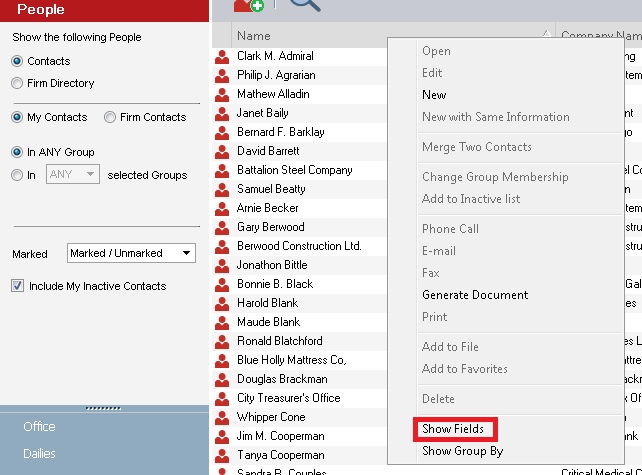
Right-click on any column header in the People list.
This opens a menu with options related to your current view.
-
Choose Show Fields or a similar option depending on your version.
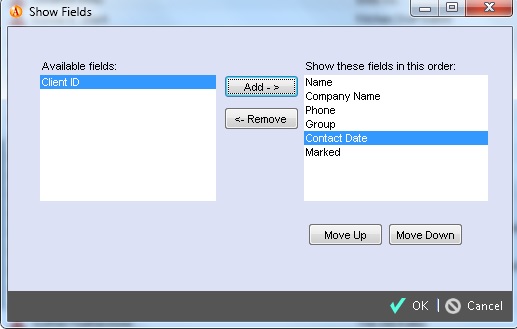
This will open a box showing available fields on the left and currently shown fields on the right.
-
To add a column:
-
Select a field from the Available fields list on the left.
-
Click the Add button in the middle to move it into the view.
- To remove a column:
-
Select a field from the list on the right (the ones currently shown).
-
Click Remove to take it out of your People index view.
- To reorder columns:
-
Select a field in the right-side list.
-
Use Move Up / Move Down to change where it appears in your table.
Columns at the top of this list show up on the leftmost side of your table, and lower ones appear more to the right.
Customizing your columns lets you focus on the information that matters most, whether you’re sorting, searching, or reviewing contacts.
You can always revisit the Show Fields dialog to add, remove, or reorder columns as your needs change.
Frequently Asked Questions
Is there a limit to how many columns I can have?
Yes, you can display a maximum of 10 columns at any given time.
Do these changes affect other users?
No. Column customization is saved to your individual user profile, so your colleagues can maintain their own preferred views without affecting yours.
How do I sort by a specific column?
Once a column is added, simply click the column header to sort your entire contact list by that specific field.